
Buying from yahoo auctions, mercari, and other auction sites
We can purchase items from auction sites. We can accept requests for traditional bids as well as buy-it-now.
Auction bidding policy
When you place a bid, we charge a bidding fee per item, depending on the result of the auction:
If you win: a flat bidding fee of $1.25 per item.
If you lose: a non-refundable bidding fee of 2% of your bid per item, with a $1.50 minimum and a $5.00 maximum.
For bids of $1,000 or more, we also collect a $100 deposit. If you win, we collect the remaining amount. If you lose, the deposit is returned to your Japan Rabbit wallet.
If you win the auction, we'll purchase the item on your behalf and charge the remaining applicable costs, including the item price, service fees, and any domestic shipping charges. Payment for these costs must be made within 48 hours of the auction's closing, or your account may be suspended. If you lose the auction, the order will be canceled, and the lost-auction bidding fee will not be refunded.
Fees
PayPay Flea Market, Fril (Rakuma): $5.00 per shop link. Since these must be processed individually, this fee applies per item link — even if you buy multiple items from the same seller.
Yahoo Auctions: $3.75 per item, plus our service fee. This applies per item listing, even if a seller combines listings.
Mercari: $3.00 per item, plus our service fee. This applies per item listing, even if a seller combines listings.
Add an item to your cart anytime to see a full quote with all service fees included, or see our Pricing page for details.
Mercari: How Bidding Works
Immediate maximum bid: Unlike Yahoo! Auctions, Mercari does not use automatic incremental bidding. If you place a bid of, for example, ¥20,000, the current bid jumps directly to ¥20,000. You pay the amount you bid, regardless of other bids.
Yahoo Auctions: How Bidding Works
Japan Rabbit's bidding system isn't live or automated, so we strongly recommend entering your true maximum bid upfront — inputting a low bid first and raising it later can cause you to lose the auction.
Why enter your max bid upfront: Yahoo Auctions don't work like TV or movie auctions. Once you set a max bid, it's automatically increased in small increments to stay ahead of competing bids — up to your limit. This means your final price is often lower than your max, even though you entered the full amount from the start.
Example:
The auction starts at ¥10,000.
You enter a max bid of ¥15,000 in Japan Rabbit.
We enter this into Yahoo Auctions on your behalf. Your current bid becomes ¥10,500 (the minimum increment above the starting price).
Another bidder sets a max bid of ¥12,000.
Yahoo Auctions automatically raises your bid to ¥12,500 — still below your ¥15,000 max.
The auction closes. Your final price is ¥12,500, plus any Japan Rabbit order fees (storage, service, and shipping calculated separately).
Automatic bidding increment
The automatic bidding increment depends on the current bid.
Current bid | Increment |
1 to 999 JPY | 10 JPY |
1000 to 4999 JPY | 100 JPY |
5000 to 9999 JPY | 250 JPY |
10000 to 49999 JPY | 500 JPY |
50000 or more JPY | 1000 JPY |
Source: Yahoo! Japan Auctions Help
Changing your max bid
Before checkout: change it anytime while the item is still in your cart.
After checkout: let us know before 6 PM JST on the day the auction ends.
Note that we may not be able to process a bid increase depending on email volume at the time, so it's always best to enter your true maximum bid at the time of bidding rather than relying on later increases.
Sniping protections
Sniping — placing a bid in the final minutes to try to win without giving others a chance to respond — is guarded against on Yahoo Auctions in two ways:
Auto-extension: a bid placed within 5 minutes of the auction's end automatically extends it by another 5 minutes, and the process repeats if more bids come in.
Max bid protection: your bid keeps auto-incrementing up to your set maximum, so a last-second bid can't beat you unless it exceeds your max.
Buy it now
Some auctions have a “buy it now” option. You can identify buy-it-now auctions, as they have a dark red button labeled 今すぐ落札.
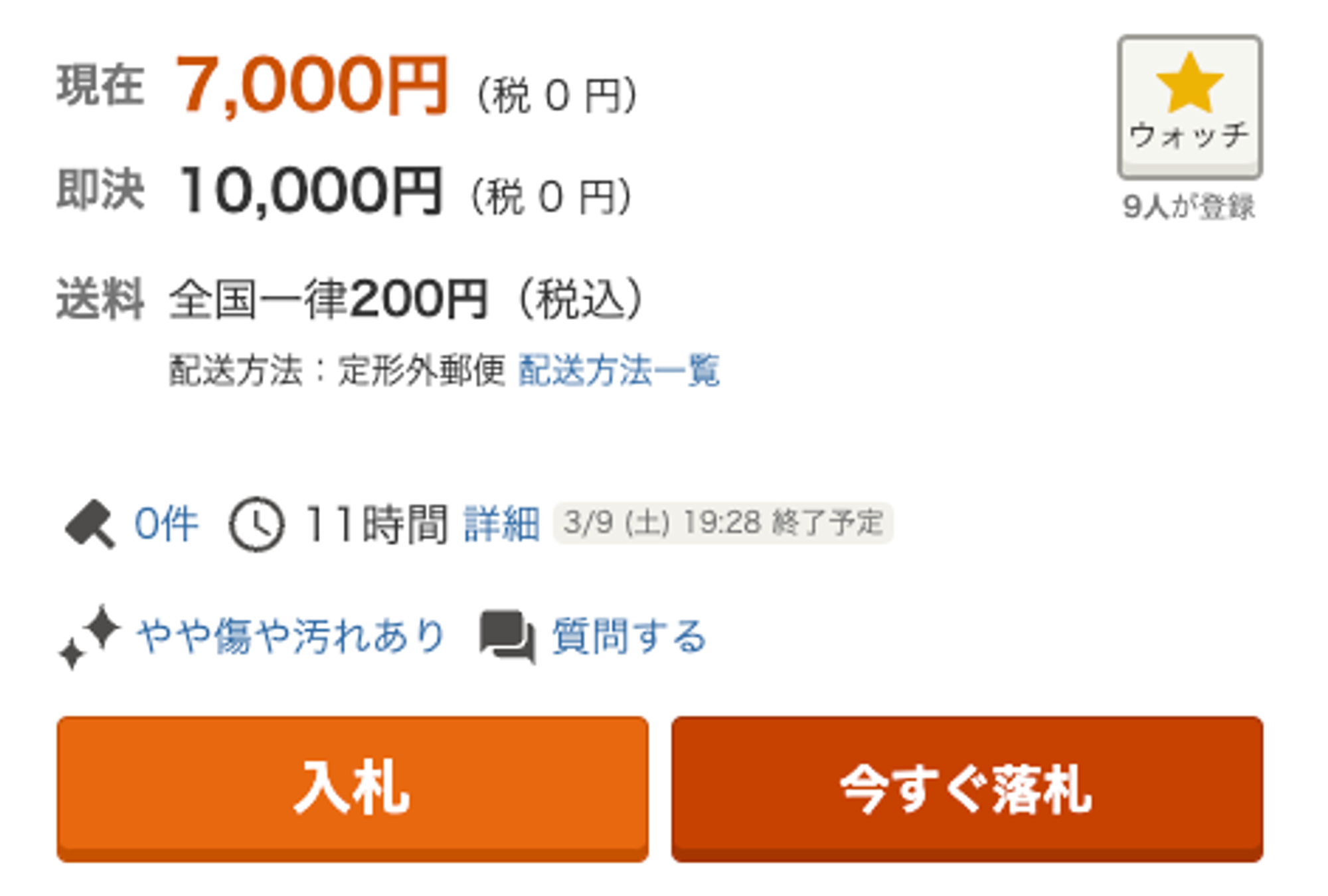
The current bid price is in orange (現在). The buy-it-now price is shown below the bid price in black (即決).
If the buy-it-now price is within your budget, we recommend setting that price to quickly secure your items. Simply enter the buy-it-now price as your max bid in Japan Rabbit.
Note for Yahoo Auctions: if a Yahoo Auctions listing has a buy it now price and your submitted max bid meets or exceeds that amount, incremental bidding will not apply. Your order will be purchased immediately at the full buy it now price, even if no other bidders exist. If you would like to try for a lower price through regular bidding instead, set your max bid below the listing's buy it now price.